Fast VPN: Secure Speedy Proxy
- 4.9
- Rating
- 1.00M
- Installs
- Free
- Price

 Analysis by App-foxy
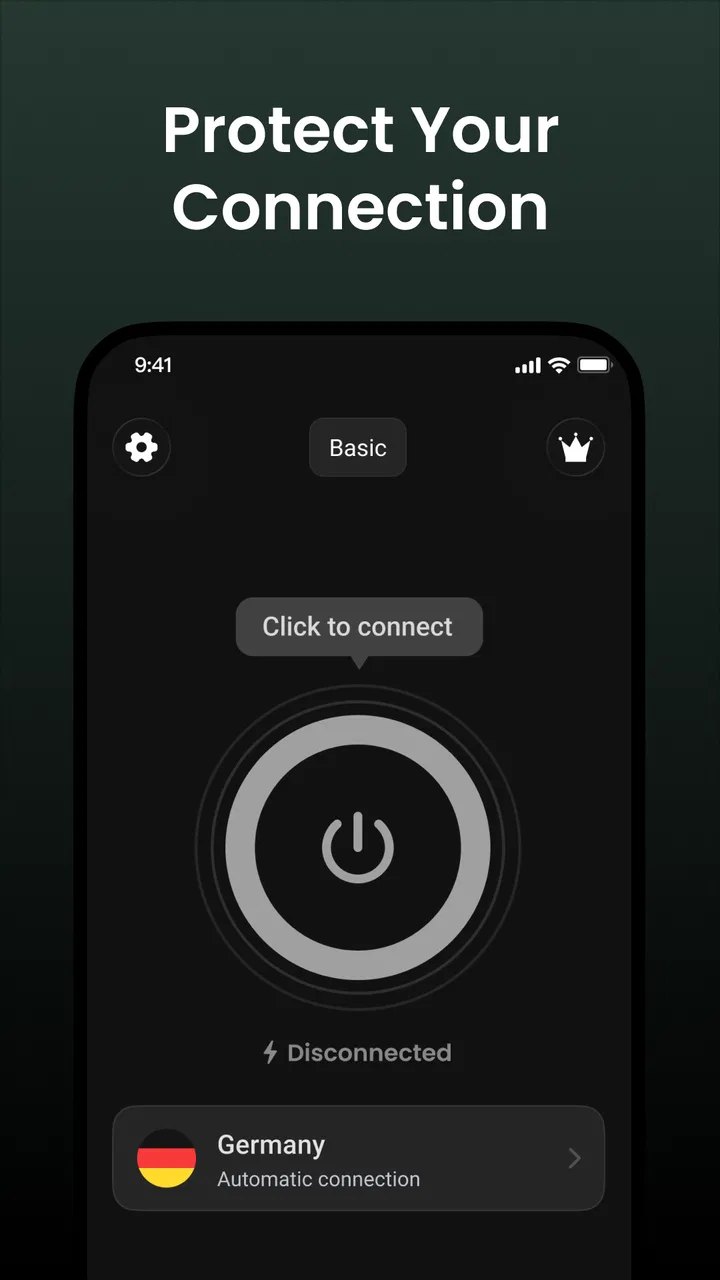
I tried Fast VPN: Secure Speedy Proxy as a lightweight productivity app for situations where I wanted a quick privacy layer without spending time learning a complicated interface. Its central promise is simple: choose a server, tap to connect, and use the internet through the app’s proxy connection. That narrow focus is also the most important thing to understand before installing it. This is built for convenience first, not for people who want an extensive control panel or a long list of technical settings.
The app is free, aimed at everyone, and comes from Fast Proxy Dev Lab. It has attracted more than a million installs and holds a 4.9 average from roughly 32 thousand ratings, which suggests that its straightforward approach appeals to a broad audience. I would still treat popularity as a starting point rather than proof that it is the right privacy tool for every situation. A VPN handles sensitive traffic, so my decision depends less on a polished connection button and more on what the app lets me understand and control.
What Fast VPN feels like in everyday use
The first impression is deliberately uncomplicated. Rather than asking me to work through a long setup process, Fast VPN: Secure Speedy Proxy puts the connection task at the center. I can select a server and begin with a single tap. That makes sense for a person who wants protection on public Wi-Fi, a temporary connection while travelling, or a quick way to avoid using an open network directly.
You May Also Like

 Blood Strike: 2.5 Anniversary
Blood Strike’s Loadouts Turn Every Drop Into a Tactical Gamble
A close look at Blood Strike’s custom loadouts: how fast access to signature weapons reshapes its battle royale rhythm, rewards preparation, and narrows the gap between fights.

 Pandora - Music & Podcasts
Pandora’s Music Is Easy to Start, but Harder to Recover
Pandora’s strength is its low-effort path from a seed to a station. Its weak spot is how much confidence it asks you to place in connection, setup, and quiet recovery.

 8 Ball Pool
 Is Built on Rivalries, Rematches, and Routine
A close look at the rivalries, rematches, shared routines, and unanswered safety questions that turn a quick pool match into a persistent mobile community.

 Samsung Music
’s Quiet Strength Is Playing What You Already Own
Its reach comes less from spectacle than from dependable access to a personal library. That simplicity is both the app’s strongest retention engine and its ceiling.

 AccuWeather: Weather Radar
AccuWeather Review: A Quick, Clear Forecast for Everyday Decisions
For everyday plans, the best forecast is the one you can understand quickly. AccuWeather makes rain timing, radar, and local conditions easy to act on, with a few trade-offs.

 Hill Climb Racing
Why Hill Climb Racing Still Turns Crashes Into One More Run
A tiny car, a bumpy hill and one more upgrade: Hill Climb Racing keeps resurfacing because its simple chaos makes every near-miss feel personal.
More From Our News Desk



In a normal coffee-shop scenario, I would open the app before checking email, browsing a work dashboard, or sending a message. The useful habit is to connect before opening those services, not after. If I wait until a sensitive page is already loaded, I have made the workflow less consistent. The app’s simple design helps here because there are fewer screens between the intention to connect and the action itself.
Server choice is another practical part of the experience. I would not automatically pick a distant location just because it appears first or sounds more appealing. For ordinary browsing, a nearby option is usually the sensible starting point because distance can affect responsiveness. If one location feels sluggish, changing servers is more useful than repeatedly disconnecting and reconnecting to the same one.
That simplicity can be a strength when I am in a hurry, but it also means the app is not aimed at advanced VPN users who want to tune every aspect of a connection. People looking for detailed protocol selection, extensive automation, or a large collection of network diagnostics may feel that the interface leaves too much out. Fast VPN is easier to approach precisely because it does not try to expose every technical decision.
Trust starts with what the app makes visible
A privacy app deserves a more careful review than an ordinary utility. A large install figure and an excellent average rating can tell me that many people find the product usable, but neither one explains how the service handles traffic, what information is collected, or how clearly those practices are presented. I therefore look at the visible choices available to the user instead of treating the connection animation as evidence of complete privacy.
Fast VPN: Secure Speedy Proxy presents itself as a tool for protecting online privacy, but I would not confuse that purpose with total anonymity. A VPN can change how traffic is routed and reduce exposure on an untrusted network, yet it does not make every online activity invisible. Websites can still have their own tracking systems, accounts can still identify me when I sign in, and careless downloads remain risky.
The developer is identified as Fast Proxy Dev Lab, and the app is currently at version 3.2.5. Those details help me recognize the product I am installing, especially when several similarly named VPN utilities appear in an app marketplace. I would check that the developer name and app identity match before installing, since privacy tools are exactly the kind of apps where choosing the wrong imitation could create unnecessary risk.
The age classification is Everyone, which makes the app approachable for a general audience. That label is about suitability, not a guarantee that every network activity is safe. I would still explain to a less experienced user that the app protects a connection path rather than judging links, websites, messages, or files for them.
Verified choices matter more than a fast first tap
The most useful control is the server selector. It gives me a choice instead of forcing one fixed route, and that choice has a practical purpose beyond appearance. I can try a nearby server for regular browsing, switch when a route is slow, and avoid assuming that one location will perform equally well at every moment.
I also treat the connection state as something to check rather than something to assume. Before using a banking site, entering a password, or sending a work document, I would confirm that the app shows an active connection. After finishing, I would decide whether to leave it running or disconnect. Keeping a VPN active all day can be convenient, but it may also add latency or interfere with services that expect my usual network location.
This is where the app’s minimal design creates a trade-off. Fewer visible decisions make it easier for a newcomer to connect, but they provide less room for an experienced user to verify technical details. If I needed granular information about the tunnel, extensive connection rules, or specialized handling for individual apps, I would compare Fast VPN with a more configurable alternative before relying on it for a demanding workflow.
One useful routine is to separate privacy needs from location needs. If I am simply using public Wi-Fi, I would choose a sensible nearby server and leave the location question alone. If I am testing how a website behaves from another region, I would choose deliberately and remember that changing apparent location can affect language, search results, sign-in alerts, and content availability. The server list is a control, not a promise that every service will respond exactly as expected.
Moments when I would be especially cautious
I would use the app most carefully when handling sensitive information. A VPN can be helpful on hotel, airport, library, or café networks, but I would still use encrypted websites, strong passwords, and multi-factor authentication. The app should be one layer in a sensible security routine, not the only layer.
I would also be careful with account activity after changing servers. Some services may notice an unfamiliar network route and ask for an additional verification step. That is not automatically a fault in the VPN, but it can be inconvenient if I am trying to access an account quickly. For a work platform that is sensitive to changing locations, I might prefer a stable connection rather than switching servers repeatedly.
Streaming, shopping, and financial services can also behave differently through a proxy or VPN connection. A page may load more slowly, a payment service may request verification, or a site may treat the connection as unusual. In those cases, disconnecting temporarily may solve the problem, although I would only do that on a network I trust. This is an important practical limitation: privacy protection and frictionless access do not always point in the same direction.
Another overlooked moment is app installation and updating. I would install Fast VPN through a legitimate app marketplace and keep an eye on the listed developer and version. A privacy tool downloaded from an unknown source defeats the point of being cautious. The current version is 3.2.5, so I would use the marketplace’s normal update path rather than searching for unofficial packages.
How much control does the user really have?
Fast VPN gives the user two obvious decisions: whether to connect and which server to use. That is enough for a basic workflow, and it prevents the first-run experience from becoming a technical lesson. I appreciate that approach when I am helping someone who would otherwise avoid VPN software because it looks intimidating.
At the same time, user agency is not only about having a large button. It is also about understanding what that button does. I would read the app’s current privacy and permission information before making it part of my regular routine, paying attention to the explanations shown by the marketplace and inside the app. I would not grant unrelated access simply because the app requests it, and I would revisit those choices after updates.
That cautious approach is especially important for a free VPN. The absence of a purchase decision does not remove the need to understand how a service operates. I would avoid entering unnecessary personal details, avoid assuming that “free” means without trade-offs, and check whether the app gives clear account or connection controls that match my expectations. These are practical questions I would answer from the visible permission and privacy screens before trusting it with frequent use.
I would also decide when not to use it. On my private home network, if I am troubleshooting a connection or using a service that fails through a VPN, temporarily disconnecting can be reasonable. On an open public network, I would be more reluctant to browse unprotected just to gain speed. The right choice depends on the sensitivity of the activity and the reliability of the network, not on a rule that the VPN must always remain active.
Where it beats ordinary alternatives, and where it does not
Compared with browsing without a VPN, Fast VPN offers a more deliberate privacy workflow: open the app, choose a route, connect, then begin the session. Its advantage is accessibility. Someone who does not want to compare a long list of technical options can get to the main action quickly.
Compared with a browser’s private mode, it addresses a different problem. Private browsing can reduce local history or session traces on a device, but it is not the same as routing the connection through a VPN. I would use private browsing for local session separation and Fast VPN for network-related privacy needs, while remembering that neither one prevents websites from recognizing an account I have logged into.
Compared with a more advanced paid VPN service, this app may be preferable for a person who values a free, uncomplicated interface and occasional use. A specialist service may be a better fit for someone who needs extensive server information, detailed protocol controls, dedicated support, or a carefully managed long-term account. I would not choose Fast VPN solely because its rating is higher than another app’s; I would choose it when its simpler workflow matches what I actually need.
There is also a difference between convenience and transparency. A quick connection can reduce mistakes caused by confusing menus, but a sparse interface can leave technical users wanting more evidence and more settings. That is the central trade-off I see here. Beginners gain a lower barrier to entry, while experts may prefer a product that exposes more of the underlying connection behavior.
Who should install it and who should look elsewhere
I can recommend Fast VPN to someone who wants an uncomplicated privacy utility for occasional public Wi-Fi use, travel, or basic browsing. It is also a reasonable starting point for a family member who has never used a VPN and needs clear, limited choices rather than a wall of network terminology.
I would be more hesitant to recommend it as the sole security measure for highly sensitive professional work. Anyone handling confidential business material, managing multiple devices, requiring predictable location behavior, or needing advanced connection policies should compare it with a service designed around those requirements. The app’s simplicity is helpful, but it should not be mistaken for a complete security program.
I would also suggest skipping it if a person dislikes checking privacy disclosures and permissions. No VPN should receive automatic trust merely because it connects quickly. A user who wants full control over data practices, account management, and technical configuration may be happier with a provider whose documentation and settings are more extensive and easier for that user to audit.
My practical verdict after weighing convenience against trust
Fast VPN: Secure Speedy Proxy succeeds at making the basic VPN action approachable. I like the direct server choice and one-tap connection because they fit real situations where I have only a moment before joining an unfamiliar network. The free price and Everyone classification also make it easy to try without turning the first experiment into a major commitment.
My approval is conditional rather than automatic. A 4.9 average from around 32 thousand ratings is encouraging, and more than a million installs show that the app has reached a substantial audience, but those figures do not answer the privacy questions I care about most. I would inspect the visible permissions, privacy explanations, and user controls, then test it first with low-risk browsing before making it part of a sensitive routine.
The best way to use it is intentionally: choose a sensible server, confirm the connection before opening important services, expect occasional friction with accounts or location-sensitive websites, and disconnect when the VPN is causing a problem on a trusted network. That workflow respects both the app’s strengths and its limits.
My final view is that Fast VPN is a good fit for readers who want a simple productivity tool for adding a privacy layer without learning advanced networking. It is not the right choice for everyone, particularly users who need deep technical verification or highly specialized controls. The strongest reason to try it is its low-friction workflow; the strongest reason to pause is the need to evaluate trust through the permissions, data practices, and choices visible to you.
FAQs for Fast VPN: Secure Speedy Proxy
01What is Fast VPN: Secure Speedy Proxy used for?
Fast VPN: Secure Speedy Proxy is designed to create an encrypted connection between your device and the internet. It can help protect data on public Wi-Fi, improve privacy by masking your IP address, and provide access to websites or services that may be restricted on certain networks. However, it should not be treated as complete anonymity or a replacement for safe browsing habits.
02Is Fast VPN: Secure Speedy Proxy free to use?
The app may offer a free version, but access to servers, connection speeds, data limits, or advanced privacy features can vary depending on the current plan. Some functions may require a subscription or include advertising. Before activating a trial or paid package, check the pricing, renewal terms, cancellation method, and whether the subscription is managed through Google Play or the Apple App Store.
03Does Fast VPN: Secure Speedy Proxy slow down the internet connection?
As with most VPN applications, Fast VPN: Secure Speedy Proxy can affect connection speed because your traffic is routed through an additional server. The impact depends on server distance, network congestion, your original connection, and the selected protocol. In testing, choosing a nearby server generally provides a smoother experience, while distant locations may be less suitable for streaming, gaming, or large downloads.
04Is Fast VPN: Secure Speedy Proxy safe for banking and personal information?
A VPN can add protection when you use unsecured networks, such as public Wi-Fi in cafés, hotels, or airports, by encrypting traffic between your device and the VPN server. Nevertheless, users should confirm that the app’s privacy policy and permissions meet their expectations. Keep banking apps updated, use multifactor authentication, avoid suspicious links, and remember that a VPN cannot prevent phishing or malware.
05What permissions and device requirements does Fast VPN: Secure Speedy Proxy need?
Fast VPN: Secure Speedy Proxy normally needs permission to create a VPN profile on Android or iOS so it can route traffic through its servers. It may also request notification or network-related access for connection status and automatic protection features. Review the permissions during installation, install the app only from an official store, and check its current compatibility, storage needs, and operating-system requirements before downloading.
Pros
- Simple one-tap connection makes it easy for beginners.
- Offers a quick way to secure traffic on public Wi-Fi.
- Multiple server locations can help access regional content.
- Lightweight design uses fewer device resources than many VPN apps.
- Useful for occasional browsing without complicated setup.
Cons
- Free access may include ads or usage limitations.
- Connection speeds can vary depending on server congestion.
- Privacy details should be checked carefully before trusting the service.
- Some streaming platforms may detect and block its VPN servers.
- The app may request permissions users consider unnecessary.

Fast VPN: Secure Speedy Proxy
Gallery